
Knowledgebase
August 13th - PEAK Advanced PCSOT Training Webinar registration now available!
Learn More
Question Last Updated on: 8/12/2026
When the OneDrive "Back up important PC folders to OneDrive" feature is initially turned on, OneDrive may move the Windows Documents folder into OneDrive. If the My LXSoftware folder is stored in Documents, it will also be moved.
LXSoftware does not automatically update its settings when the folder is moved. As a result, LXSoftware may be unable to start because it is still looking for the My LXSoftware folder in its previous location.
The simplest way to correct this is to uninstall and reinstall the LXSoftware application. During installation, you can select the folder's new location. After LXSoftware is reinstalled with the correct location, it will work normally with OneDrive.
Important: Only LXSoftware needs to be uninstalled. Do not uninstall OSS-3, LXDatabase Manager, or any other component included with the software bundle.
Additionally, do not use the software on multiple computers at the same time with the same data folder synced through OneDrive. This configuration is not supported.
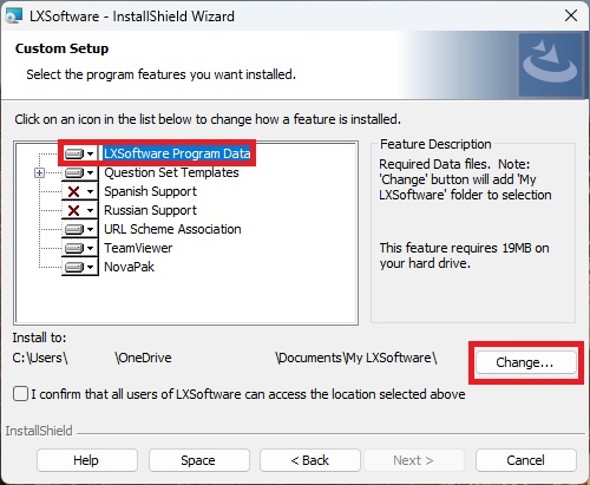
For example, if My LXSoftware is stored here:
C:\Users\YourName\OneDrive\Documents\My LXSoftware
Select this parent folder during installation:
C:\Users\YourName\OneDrive\Documents
NOTE: Do not select the My LXSoftware folder itself.
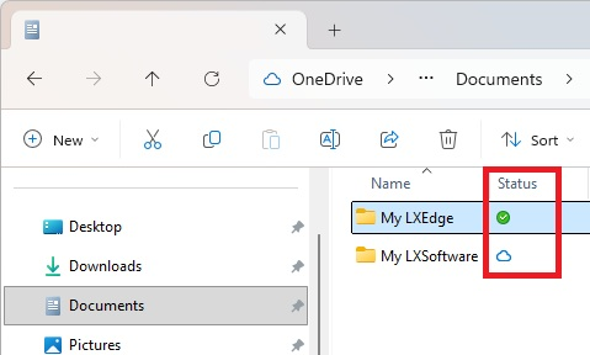
If you are unsure whether the My LXSoftware folder is stored in OneDrive, check it in File Explorer:
A blue cloud icon or green checkmark icon next to the My LXSoftware folder means that it is stored in OneDrive.
NOTE: The screenshot below also displays the My LXEdge folder, but the same OneDrive status icons and menu options apply to My LXSoftware.
When the My LXSoftware folder is stored in OneDrive, configure OneDrive to keep the folder downloaded on the computer:
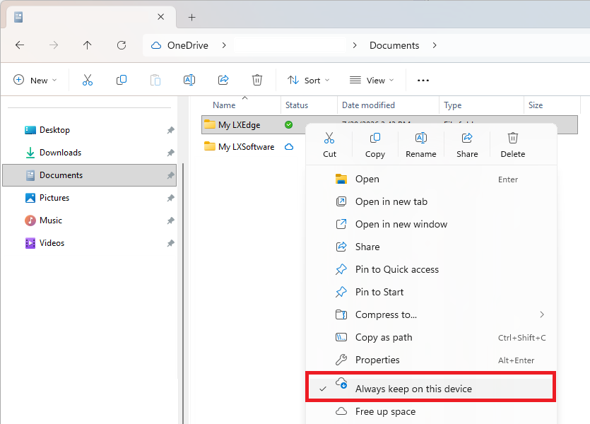
The "Always keep on this device" setting prevents OneDrive from making files in the My LXSoftware folder online-only to free up space on the computer.
NOTE: An online-only file remains stored in OneDrive but is not downloaded to the computer. When LXSoftware needs an online-only file, OneDrive must download it before LXSoftware can continue. LXSoftware may appear frozen or unresponsive while the file is downloading.
Unable find an answer to the question that you looking for in our FAQ section? Submit your question directly to our customer service representatives.
Join our email list for up-to-date product news Sign Me Up!

3700 Sagamore Pkwy N
Lafayette, IN 47904
Phone: (765) 423-1505
Fax: (765) 423-4111
info@lafayetteinstrument.com
Copyright © 2009 - 2026 Lafayette Instrument Company. All Rights Reserved.